
Lead a Bible study you'd want to attend.
Small Group turns Claude, ChatGPT, Gemini or Grok into a patient helper for the volunteer who leads the group. Tell it the passage, your group and how much time you have, and get a session plan with timings, discussion questions that move from what the text says to what it means to what we do, short background notes, a reading plan, and kind ways to handle hard questions and prayer time. It respects your church's tradition and points you to your pastor when it matters.
Get Small Group Bible Study Leader for $5 Work out my pace
$5 once · card, Apple Pay or Google Pay · download in a minute
Into more than one hobby? Get all 70 hobby skills for $19, this one included.
- One-time $5
- Instant email delivery
- 14-day refund
- Works in Claude, ChatGPT, Gemini and Grok
Session plan: The lost son (Luke 15:11 to 32)
Adults · 10 people · 75 minutes · mixed Bible background
Discussion: 40 minutesQuestions from easy to deepPrayer in pairs
- 0:00Welcome and opener: "Tell us about a time you came home"Everyone can answer; no right answerOpen
- 0:12Read Luke 15:11 to 32 aloud, two readersContext: Luke 15:1 to 2, who Jesus was talking toRead
- 0:17Observe: what does the father do when he sees him?Then interpret: why does the older brother refuse to go in?Discuss
- 0:45Apply: which brother is easier for you to relate to?One honest step for this weekApply
- 0:57Prayer in pairs, then close togetherRequests stay in the roomPray
What an experienced small group leader would tell you over coffee
One skill, six jobs. Claude, ChatGPT, Gemini or Grok picks the right one from what you ask.

Session plans
A timed plan for one passage or a whole book: opener, reading, discussion, application and prayer that fits your meeting length.
Questions that open people up
Discussion questions that move from observation to interpretation to application, with follow-ups for quiet groups.
Background in plain words
Short notes on setting, genre and history, with honest labels on what scholars agree on and where Christians read it differently.
Reading plans
Chapters per day to finish a book or the whole Bible by a date, using correct chapter counts, with the math shown.
Prayer and care
Prayer time that includes everyone, keeping confidences, and caring for members through illness, grief and new babies.
Any group, any age
Plans for 4 or 40, couples, men's and women's groups, seniors, teens and Sunday school classes, with breakouts when it's big.
Ask it like you'd ask a leader who's done this for years
It knows how discussion works, so the plan is specific to your passage, your people and your clock.
A 75-minute plan that gives most of the time to the group
- Welcome and opener, 12 minutes. "Tell us about a time you came home after being away." Everyone can answer it.
- Read, 5 minutes. Two readers: verses 11 to 24, then 25 to 32. First, read 15:1 to 2 so the group sees Jesus is answering people who grumbled that he ate with sinners.
- Discuss, 40 minutes. Observe: What does the younger son ask for, and what does he plan to say? What does the father do before the son finishes? Interpret: Why does the older brother stay outside? Who in 15:1 to 2 is like each son? Apply: Which brother is easier for you to relate to, and why?
- Prayer, 15 minutes. In pairs, then one short prayer to close. Requests stay in the room.
- Close, 3 minutes. Next week's passage and who brings snacks.
Leader tips
After a question, wait about 10 seconds before you speak. Ask "What do others think?" before giving your own answer. If someone asks a doctrinal question you can't answer, say "Good question, let me ask our pastor" and bring it back next week.
Example answer from the full skill. Your answers depend on what you ask.
Respectful by design
Christians read the Bible in many traditions. Small Group helps you lead well in yours.
- Your church decides doctrineIt lays out where Catholic, Orthodox and Protestant readings differ, fairly, and sends doctrinal questions to your pastor or priest.
- Your translation, by referenceIt points to verses by reference and quotes only a few words, so you read from the Bible your group uses.
- No invented sourcesIt never makes up quotes from scholars or church fathers, and says how sure a background note is.
- Safety comes firstIf someone in your group is in danger, being abused or talking about self-harm, it tells you to get emergency help and your church leaders, right away.
Up and running in two minutes
No app to learn and nothing to install on your computer. It lives inside Claude, ChatGPT, Gemini or Grok.
Buy once
Pay $5 by card, Apple Pay or Google Pay. Your download link arrives by email in about a minute.
Add it to Claude, ChatGPT, Gemini or Grok
Upload the ZIP under Skills in Claude, or the unzipped folder in Gemini. It takes about 30 seconds. In Grok, upload the ZIP, or paste the included paste-in file into a new skill. In ChatGPT, add the included paste-in file to a Project.
Just ask
"Plan 6 weeks on Philippians." "Write questions for Psalm 23 for our seniors class." "Someone keeps dominating discussion. What do I do?"
Pick your app for the exact clicks
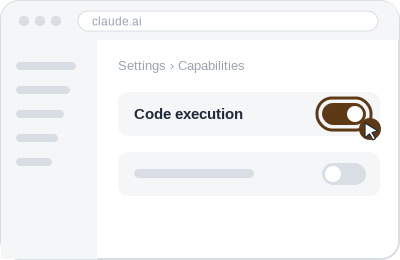
1In Settings, then Capabilities, turn on code execution.
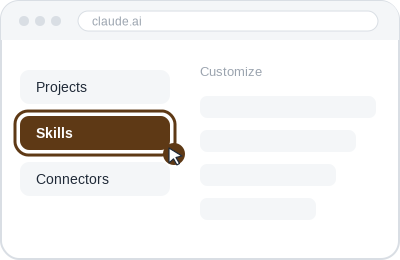
2Open Customize, then Skills.
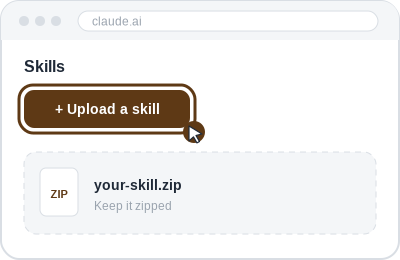
3Click +, choose Upload a skill, pick the ZIP. Keep it zipped.
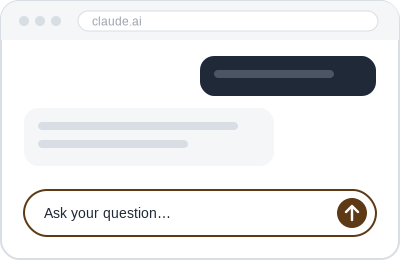
4Start a new chat and ask. Claude picks up the skill.
Works on every Claude plan, including the free one. Free plans have lower usage limits.
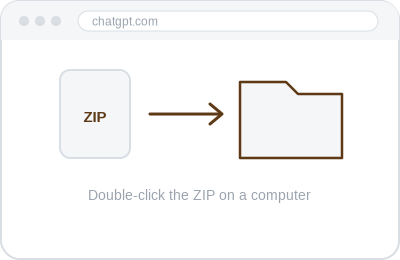
1On a computer, unzip the download and find ANY-AI-PASTE-VERSION.txt.
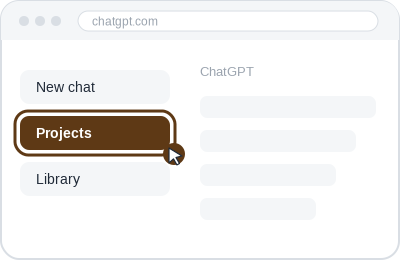
2In ChatGPT, open Projects and make a new project.
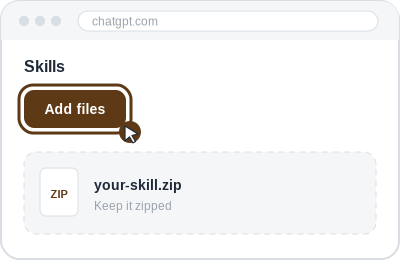
3Add the .txt file to the project. In its instructions, type: Follow the attached file.
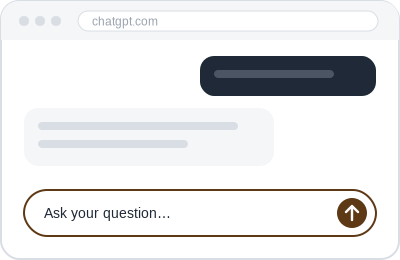
4Start a chat in that project and ask. On a Business, Enterprise or Edu plan, you can upload the ZIP under Skills instead.
Personal ChatGPT plans (Free, Plus, Pro) don't have a Skills page yet, so you use the paste-in version in a Project. On a Business, Enterprise or Edu plan, go to chatgpt.com/skills, choose Add, then Upload from your computer.
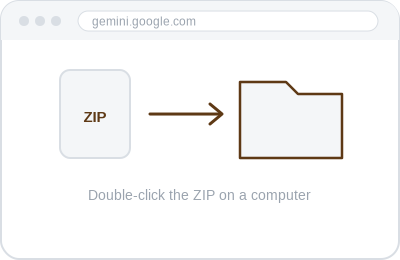
1On a computer, unzip the download. You get a folder.
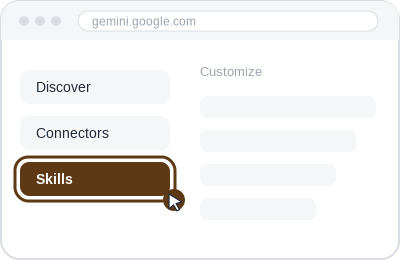
2At gemini.google.com, open Customize, then Skills.
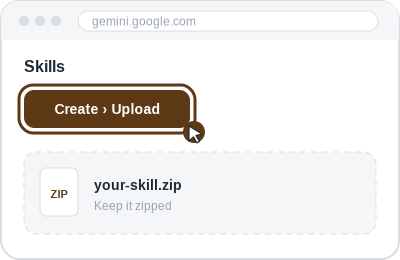
3Choose Create, then Upload, then folder. Pick the unzipped folder.
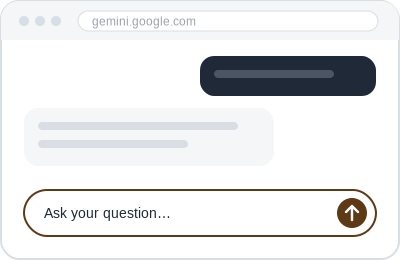
4Start a new chat and ask.
Gemini takes the unzipped folder, not the ZIP. Menus in Gemini change often, so names may differ slightly.
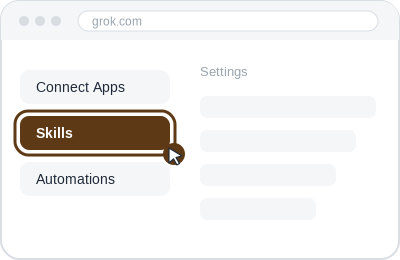
1At grok.com, open Settings, then Skills.
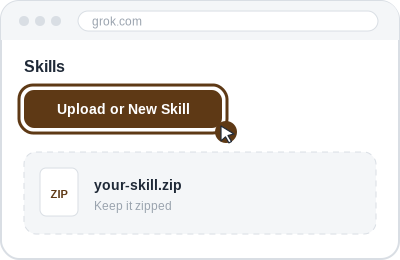
2If you see Upload, pick the ZIP. If you only see New Skill, use the next step.
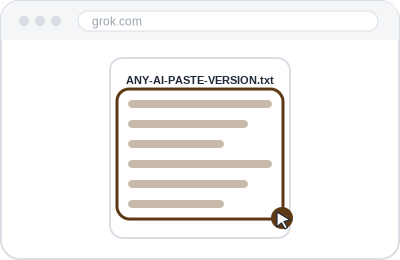
3New Skill: name it, then paste the text of ANY-AI-PASTE-VERSION.txt (below the line of equals signs) into Instructions.
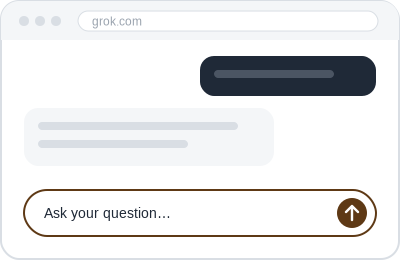
4Save it, start a new chat and ask.
Some Grok plans upload the ZIP; others show a New Skill form, where you paste the skill text in. Menus in Grok change often, so names may differ slightly.
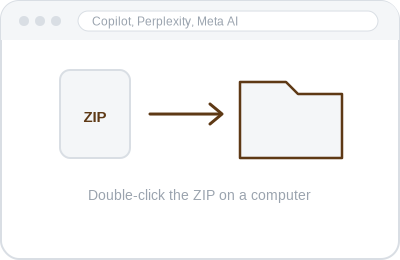
1No Skills page? Unzip the download on a computer.
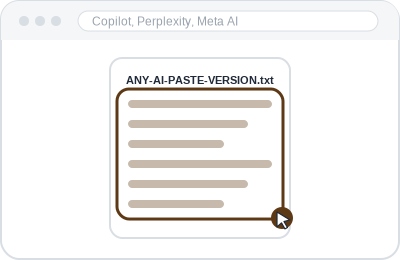
2Open ANY-AI-PASTE-VERSION.txt and copy everything.
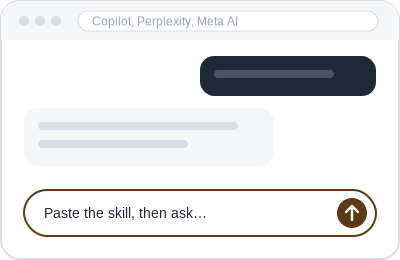
3Paste it into a new chat, then ask your question.
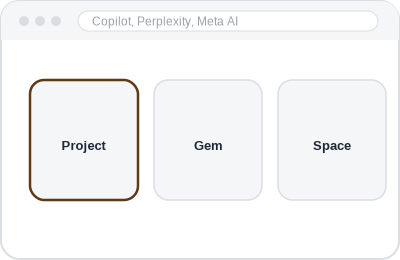
4To keep it on, add it to a ChatGPT Project, Gemini Gem or Perplexity Space.
Using Claude Code, Codex, Cursor or another coding agent? Unzip it into the skills folder, for example unzip small-group-bible-study-leader.zip -d ~/.claude/skills/
On your phone? Go ahead and buy: the download link goes to your email and works for a year. Adding a skill is easiest from a computer, in a web browser or the desktop app, so open that email there when you're ready. Want to try it on your phone today? Open the ZIP, copy ANY-AI-PASTE-VERSION.txt into any chat app, and ask.
Start with the free Session Plan
A small skill that turns one passage into one ready-to-lead group meeting: a timed plan, an opener, discussion questions from easy to deep, a short context note and a prayer time.
- A timed plan that fits your meeting length
- Observation, interpretation and application questions
- A short context note and a prayer plan
Get Small Group Bible Study Leader
Pay once, use it for every study you lead. Includes the free Session Plan too.
How to add it
Upload the ZIP under Skills in Claude, or the unzipped folder in Gemini (in Grok, upload the ZIP or paste the paste-in file into a new skill; in ChatGPT, add it to a Project), then start a new chat and try: "I lead a Sunday school class of 14 adults for 50 minutes. We're starting the Gospel of Mark in January. Plan the first session on Mark 1:1 to 20 and suggest how to split Mark into weekly sessions."
See the clicks for your app. Every download also comes with a paste-in version for any other chat, and a Start Here PDF.
Step-by-step guides with pictures: Claude · ChatGPT · Gemini · Grok
Small Group Bible Study Leader
Session plans, discussion questions, background notes, reading plans, prayer and care.
$5 one time
- Session plans for one passage or a whole book
- Discussion questions from observation to application
- Background and context notes, with canon differences noted
- Reading plans with correct chapter counts and the math
- Hard questions and disagreement, handled kindly
- Prayer time and care for group members
- Plans for groups of different sizes and ages
- Updates for a year
Card, Apple Pay or Google Pay through Stripe. Taxes calculated at checkout. 14-day refund.
Giving it as a gift? Buy it, forward the email, and print a gift card.
See a real answer from the full skill
You ask: I lead 10 adults for 75 minutes, mixed Bible background. Next week is Luke 15:11 to 32. Help me plan it so it isn't just me talking.
A 75-minute plan that gives most of the time to the group
- Welcome and opener, 12 minutes. "Tell us about a time you came home after being away." Everyone can answer it.
- Read, 5 minutes. Two readers: verses 11 to 24, then 25 to 32. First, read 15:1 to 2 so the group sees Jesus is answering people who grumbled that he ate with sinners.
- Discuss, 40 minutes. Observe: What does the younger son ask for, and what does he plan to say? What does the father do before the son finishes? Interpret: Why does the older brother stay outside? Who in 15:1 to 2 is like each son? Apply: Which brother is easier for you to relate to, and why?
- Prayer, 15 minutes. In pairs, then one short prayer to close. Requests stay in the room.
- Close, 3 minutes. Next week's passage and who brings snacks.
Leader tips
After a question, wait about 10 seconds before you speak. Ask "What do others think?" before giving your own answer. If someone asks a doctrinal question you can't answer, say "Good question, let me ask our pastor" and bring it back next week.
Into more than one hobby? The Skill Pass gets you all 70 hobby skills, this one included, for $19.
New to AI skills?
Small Group is a skill: a set of expert instructions you add to your own Claude, ChatGPT, Gemini or Grok account, so it answers like a small group and Sunday school leader's guide who knows the craft.
- Using Gemini? Unzip it and upload the folder on its Skills page. Using Grok? Under Settings, Skills, upload the ZIP or paste the paste-in file into a new skill. Using ChatGPT? Add the included paste-in file to a Project.
- New to all of them? Claude is an AI assistant made by Anthropic. Make an account at claude.ai: skills work on every Claude plan, including the free one, with code execution turned on in Settings, Capabilities.
- Try the free Session Plan skill first. If you like it, the full skill is one purchase.
Not ready for an AI app? The free Bible reading pace calculator on this site works in any browser, no account needed.
Free small group tools
No sign-up, they run in your browser.
Made by Nic Hubert, What If Labs
I run What If Labs from British Columbia, Canada. I build each skill with AI help and test it on real questions, and a separate reviewer checks it before it goes on sale. If it doesn't do what this page says, email me at hello@whatiflabs.ai and I'll fix it or refund you.
No reviews yet: this store is new. Tell me how it went and I'll use it to make the skill better.
Questions
Is it for pastors?
It's made for lay leaders: small group hosts, Sunday school teachers, life group and home group leaders. Pastors preparing sermons may prefer our Study Desk store at pastor.whatiflabs.ai.
Which traditions and Bibles does it work with?
Catholic, Orthodox and Protestant groups. Tell it your church and translation. It notes where canons and readings differ, refers to verses by reference and quotes only a few words, so read the full text from your own Bible.
Can it answer doctrinal questions or counsel group members?
It can explain the main ways Christians have read a passage, but your church's teaching and your pastor have the final word. It is not counseling. For abuse, self-harm or anyone in danger, it tells you to contact emergency services and your church leaders right away.
Will the background notes always be right?
It aims for well-established facts and says how sure it is, but it can make mistakes. Check important points in a study Bible or with your pastor before you teach them.
What do I need to use it?
A Claude, ChatGPT, Gemini or Grok account. In Claude it works on any plan, including the free one, with code execution turned on (Settings, Capabilities). Free accounts have lower usage limits, so long planning sessions go further on a paid plan. It works in Claude on the web, the desktop app and Claude Code. In Gemini and Grok, upload it on the Skills page. In ChatGPT, personal plans (Free, Plus, Pro) don't have Skills yet, so you add the included paste-in file to a ChatGPT Project; Business, Enterprise and Edu plans can upload the ZIP under Skills. Coding agents that read SKILL.md files work too. Using Copilot, Perplexity, Meta AI or another chat with no Skills page? Every download includes a paste-in version (ANY-AI-PASTE-VERSION.txt) that works in any AI chat.
What if it doesn't work for me?
Email hello@whatiflabs.ai within 14 days of buying and we'll refund you in full. No forms, no questions.
How is this different from just asking an AI?
A general AI answer is often vague or skips steps. The skill gives your AI an expert's method: what to ask you first, the checklists and calculations to run, and the mistakes to warn you about. You get consistent, specific answers instead of a different guess each time.
Do I pay every month?
No. It's a one-time price, and updates to the skill are free.
Can I get a refund?
Yes. Every purchase comes with a 14-day refund, no questions asked. Reply to your receipt email and we'll take care of it.
What if it gets something wrong?
It shows its working, so you can check numbers and dates. Tell it what's off and it will correct itself. For anything where a mistake costs money or safety, double-check before you act, as you would with any advice.
Is my information private?
The skill runs inside your own Claude, ChatGPT, Gemini or Grok account, and we never see your chats. When you buy, Stripe handles the payment and we keep your email and order so we can send the download. The terms and privacy page has the details.